
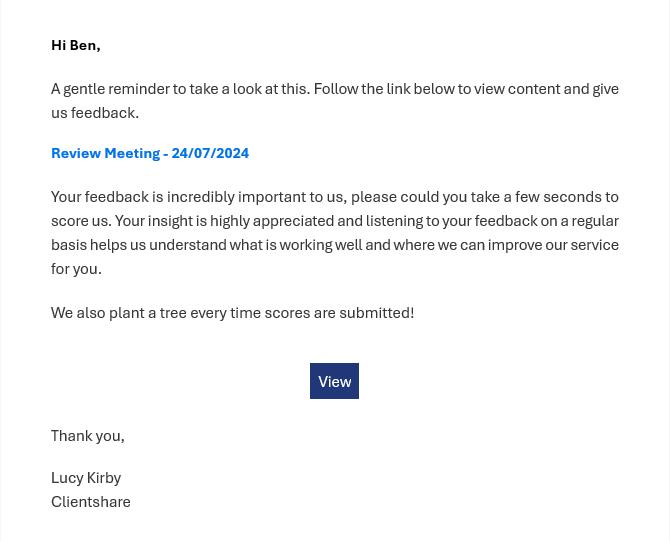
When a review is sent from Pulse, recipients receive automatic email reminders if they are yet to engage and give feedback on a review. Automatic reminders are an effective strategy for maintaining awareness, encouraging action, and identifying lack of engagement from stakeholders.
What type of reminders are sent?
There are two automatic reminders that can be sent from the platform. These include:
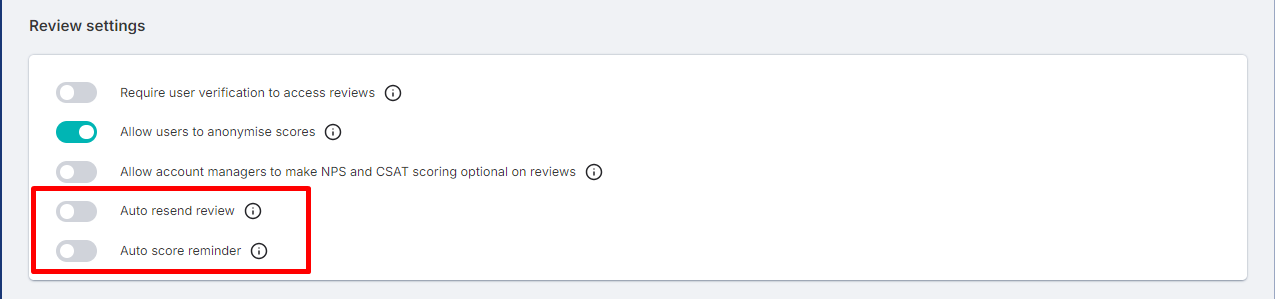
Auto resend review: A reminder will automatically be sent to recipients who have yet to open a review.
Auto score reminder: A reminder will automatically be sent to recipients who have opened a review, but not submitted a score.
How frequently are reminders sent?
Automatic reminders are sent one week and two weeks after the original Pulse review is delivered, with a maximum of two reminders being sent.
How to setup automatic reminders?
Score reminders can be set within an organisation’s workspace settings. Users with Admin or Owner permissions can adjust the automatic reminder settings, and this can be done by going to Workspace settings > Customisation > Review Settings
Read more:
How to preview and send your review
-1.jpg?width=300&height=169&name=Getting%20relevant%20stakeholders%20into%20QBRs%20-%20QBR%20Hub%20-%20thumbnail%20(1)-1.jpg)
Getting relevant stakeholders into QBRs

In the News: Clientshare used by 1-in-2 of FTSE 100
Not yet a Clientshare customer?
Learn more about Clientshare and our software solutions for service providers here or request a demo.