Automatic review reminders help increase engagement by prompting recipients to open reviews and provide feedback. These reminders are sent automatically to recipients who have not yet engaged with a review.
What this means for suppliers
- The system reduces the need for manual follow-up by automatically prompting recipients who have not engaged
- Recipients are prompted automatically at key intervals to encourage engagement
- This helps improve response rates and ensures feedback is captured consistently
How automatic reminders work
- Automatic reminders are enabled by default (though your organisation may have chosen to disable this feature. If you are unsure, please check internally or refer to your training materials)
- They are sent only to recipients who have not engaged with the review - the goal is to maximise response rates on the reviews
Reminder schedule
Reminders are sent via email at the following intervals:
- Reminder 1: 3 working days after the review is sent
- Reminder 2: 10 working days after the review is sent
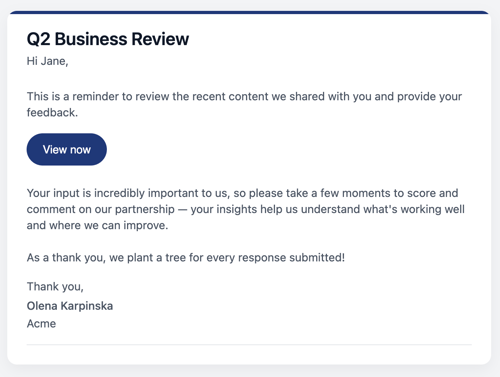
Reminder 1 (day 3)
This is the first reminder encouraging recipients to engage with the review:
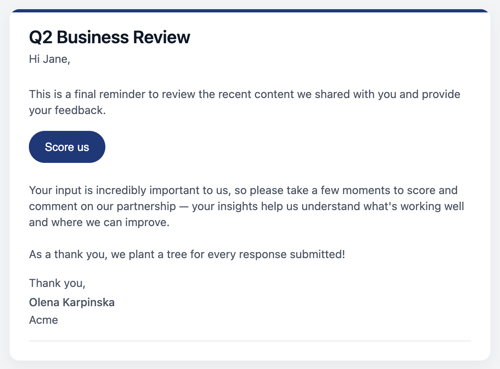
Reminder 2 (Day 10)
This is the final reminder which is sent if the recipient has not yet submitted feedback:
Useful to know
- Automatic review reminders are set at the workspace level (not organisation or account level). They can’t be customised per account, and only Admins and Owners can manage them.
- If scoring is optional and the review has been opened, a second reminder won’t be sent - even if scores were not submitted. If the review hasn’t been opened after the first reminder, the second reminder will be sent.
For any further support with enabling or disabling automatic reminders, please contact your Clientshare team.
Read more:

How to use Pulse Share-to-Many