
Clientshare is now accessible with Microsoft Single Sign On (SSO)!
SSO: Single sign-on. The use of a single account to access multiple applications.
Benefits of Single Sign On
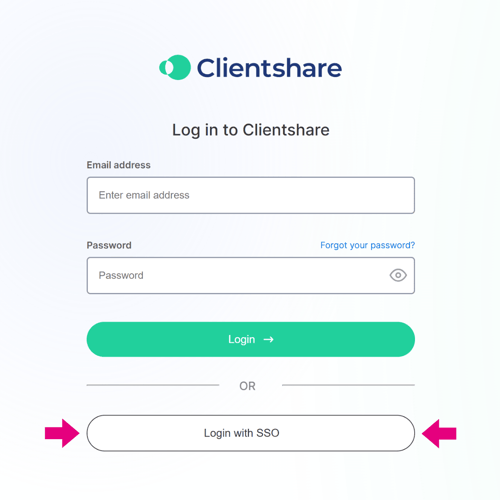
Improved user experience: easy access to applications using the same password. No log-in is required, just click “Login with SSO”.
Improved compliance with companies' security protocols: password complexity, rotation and MFA are controlled and enforced centrally on all users.
Reduced password fatigue: no need for duplicates and no need to think of new ones.
How does my organisation go live with SSO?
1. Our Customer Success team will be in touch to confirm SSO is available under your subscription agreement.
2. Let your IT team know as SSO is an IT led initiative with Azure Active Directory.
3. Clientshare activate SSO for you, then each user will need to log out of Clientshare and log back in by selecting the SSO button at the log-in screen. It normally helps if you announce this to your organization.
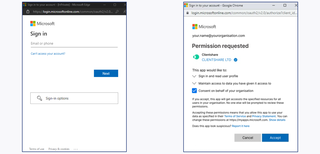
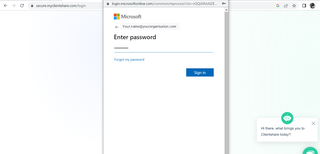
4. Going live with SSO needs to be done by the Global Administrator. The admin user will need to select Login with SSO on Clientshare's login page, Microsoft's login flow will appear for the user to enter their Microsoft credentials. A consent form will come up for the Admin to authorise the use of Clientshare's SSO application on behalf of their organisation.
Existing Users?
If you’re an existing Clientshare user, you will need to log out of your account before you sign in through SSO.
New User?
You will receive an invitation to sign in through SSO. It really is that simple.
If you have any questions about the implementation of Single Sign On, please don’t hesitate to get in touch with our Customer Success team via support@myclientshare.com
Read more:

How to whitelist emails from Clientshare
Not yet a Clientshare customer?
Learn more about Clientshare and our software solutions for service providers here or request a demo.