There are two ways to resend a review:
- Resend via the platform
- Generate a review link and share it manually
This article covers both options.
1. Resend a review via the platform
Use this option if you want the platform to resend the review on your behalf to recipients who have already received it.
Step 1: Open the review
- Go to the Account Dashboard by selecting the relevant account from the left-hand panel.
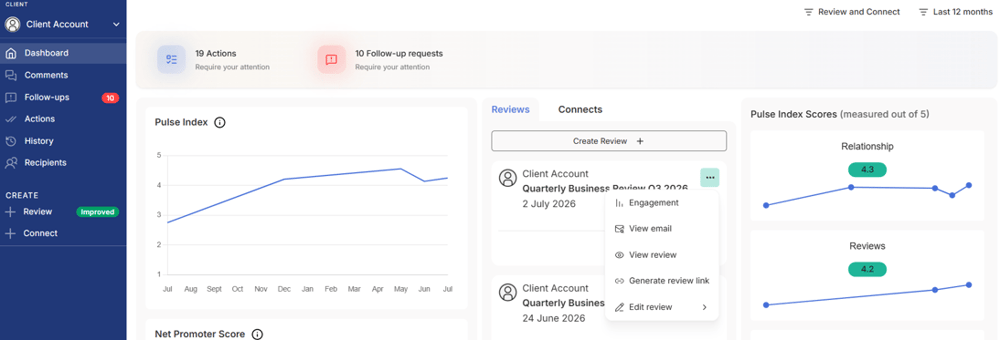
- Locate the review in the middle column, click the three dots, and select Engagement.
If the review is older, go to History from the left-hand menu and follow the same steps.
Step 2: Resend the review
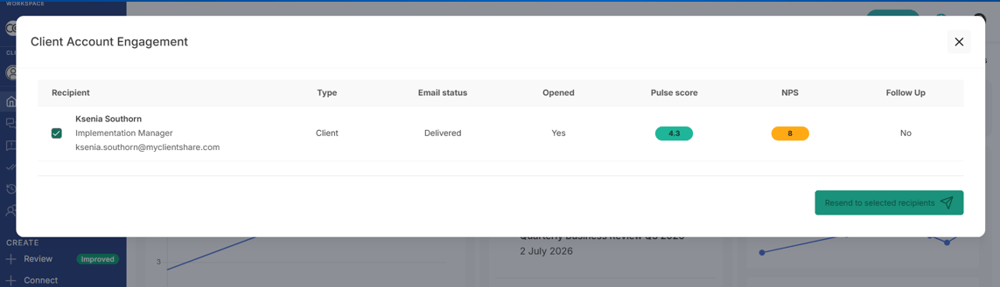
The Engagement window displays all recipients who have received the review, including whether they have opened and engaged with it.
-
- Tick the recipients you want to resend the review to.
- Click Send to selected recipients.
2. Generate a review link (manual sharing)
Use this option if you prefer to share the review yourself (for example, via email or another communication channel).
Step 1: Generate the review link
- Go to the Account Dashboard by selecting the relevant account from the left-hand panel.
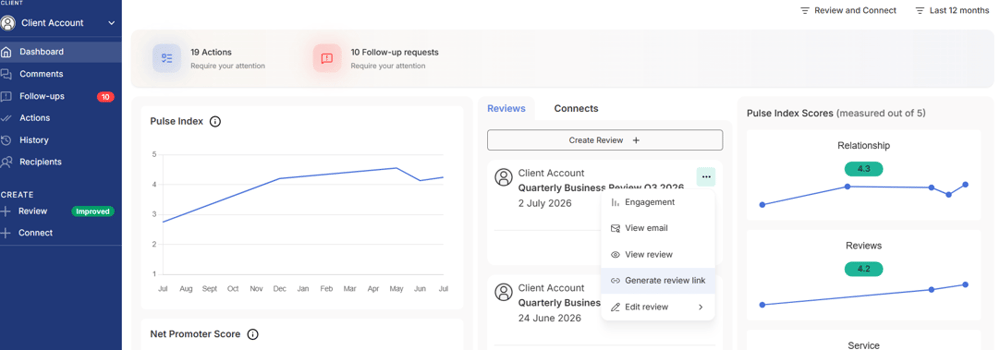
- Locate the review in the middle column, click the three dots, and select Generate Review Link.
If the review is older, go to History from the left-hand menu and follow the same steps.
Read more:
.png?width=300&height=225&name=support-article-thumbnail%20(8).png)